Manage all of your screenshots

We review a lot of programs every day here at Softonic and we tend to take a lot of screenshots. The tools we use to do this need to be easy to launch and offer a good set of tools.

Top Recommended Alternative

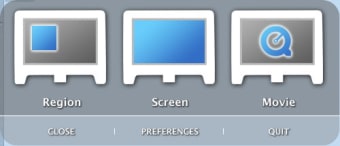
Copernicus is a solid screen capture tool which allows you to capture parts or your whole screen. You can also record small videos. Copernicus lets you set the frame rate and decide whether to rely on memory or hard drive.

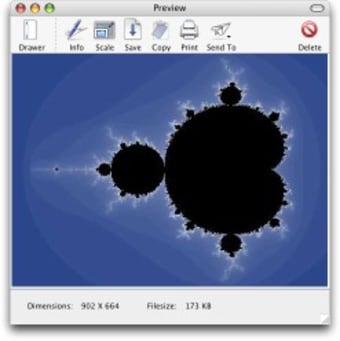
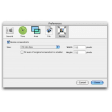
I like how Copernicus includes a preview interface for batch handling your different screen grabs. When saving you'll notice you can adjust the quality of the image, however you won't be able to change the format from JPG.

I didn't really like how Copernicus worked with F keys, which I don't find the most comfortable to work with on a Mac. However other users might find them very handy for controlling the program.


  • Pros

    • Precise capture tool
    • Capture short movies
    • Batch preview
  • Cons

    • Can only save in one format
    • Use of F keys
    • Doesn't record audio
 0/2

App specs

  • License

    Free

  • Version

    1.5.2

  • Latest update

  • Platform

    Mac

  • OS

    Mac OS X

  • Language

    English

  • Downloads

    97.3K

  • Size

    5.17 MB

  • Developer

Program available in other languages


User reviews about Copernicus

3

5 reviews

Add review

Main reviews for you

  • Anonymous user

    Can not record movies. will NOT allow me to record movies in full screen, it only records in region, no way to set it to full screen movie recording.

  • Anonymous user

    Works well on 10.6 (Snow Leopard), not on 10.7 (Lion). Copernicus works very well on my iMac mid 2007 with OS 10.6.8.There is a black screen when trying it on my MacBookAir 13" mid 2012 with OS 10.7.4 Pros: Easy to use, flexible fileformat and store folder Cons: Doesn't work with OS 10.7?

  • Anonymous user

    Convenient, but.... Saving in only one format doesn't bother me (99% of the time, JPG is what I want). What annoys me is that it forces a space after JPG, which has to be corrected. Pros: Contrary to benjamin543's experience, I use it on Snow Leopard almost daily.

  • Anonymous user

    Not compatible with Snow Leopard (OS X 10.6). It seems that this is a nifty peace of software that is unfortunately not compatible with Snow Leopard (OS X 10.6). Pros: Freeware, Features Cons: Doesn't work in 10.6

  • Anonymous user

    ...Doesnt seem to work for me. this program just crashes when I try to capture a video... Pros: would be great IF IT WORKED Cons: crashes

More

You may also like

Alternatives to Copernicus

Explore Apps

Latest articles

Laws concerning the use of this software vary from country to country. We do not encourage or condone the use of this program if it is in violation of these laws.
Softonic

Is Copernicus safe?

100/100

Score result: Clean

This file passed a comprehensive security scan using VirusTotal technology. It is safe to download.

  • Virus free
  • Spyware free
  • Malware free
  • Verified by Security Partners

    VirusTotal logo

Scan Info

Last scan
Tuesday, April 23, 2024
Scan provider
VirusTotal · Full report

File Integrity

File
Copernicus.dmg
SHA256
a471b1ecbc989407a0efb468158ea1bae83fa1cad25eead5284d175fb6da7c28
SHA1
eca7eaaaaca361d62403ef7efc9b94f769f5672c

Softonic security commitment

Copernicus has been thoroughly scanned by our advanced security systems and verified by industry-leading partners. This file comes from the official developer and has passed all our security checks, showing no signs of viruses, malware, or spyware. For more information, visit our Security and Trust Center